

No. All resources sold through The Butterfly Teacher shop are digital products. Nothing will be shipped to you by mail. After your purchase is complete, you’ll be able to download your files electronically.
Types of Sentences Activities 2nd Grade Task Cards Declarative Interrogative Exclamatory Imperative
$4.25
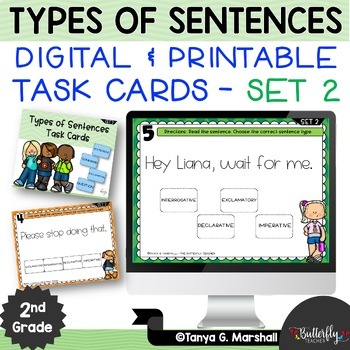
This Types of Sentences Activities set gives 2nd grade students self-grading practice identifying declarative, interrogative, imperative, and exclamatory sentences.
Number of Pages: 27 + Digital
File Type: Google Forms
Standards-Aligned
Teacher-Designed
Instant Download
Lifetime Access
Clear Directions
Google Slides Ready
Keep scrolling + check out the preview for all the details.
Products included in this bundle:
Description
Types of Sentences Activities 2nd Grade Task Cards Declarative Interrogative Exclamatory Imperative
Ever wondered how well your 2nd graders can navigate through the maze of sentences?
Introducing Types of Sentences Activities for 2nd Grade | Declarative Interrogative Exclamatory Imperative the perfect toolkit for mastering sentence types in a fun and engaging way! Whether your students are just starting out or need a little extra practice, this resource is tailored just for them!
What’s Inside Types of Sentences Activities?
- 20 Interactive Task Cards: Dive into challenges that help identify the four main types of sentences: declarative, interrogative, imperative, and exclamatory.
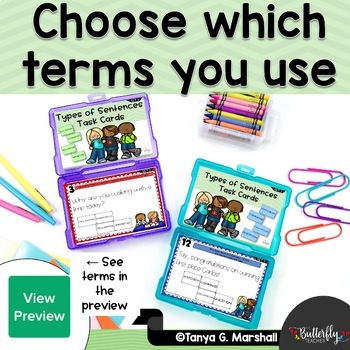
- Labels for Learning: Each sentence type comes with easy-to-remember labels:
- Telling/Statement
- Question
- Command
- Exclamation
Types of Sentences Activities Promotes Flexible Formats for All Teaching Styles:
- Printable Options: Choose from color or black & white – perfect for classroom activities!
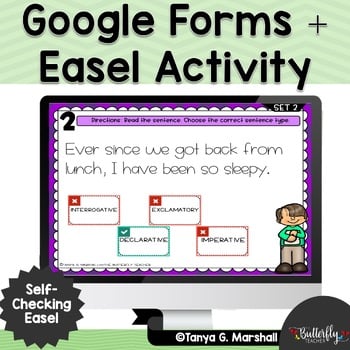
- Google Forms: Take advantage of digital convenience with our self-grading option.
- Easel Activity: Interactive and self-checking features to boost student engagement.
- SCOOT Game: Included in the printable version to get students moving and learning!
Important Note: The printable version is embedded within the Google Forms. Just click the link at the top to access it!
Ready to make sentence types a breeze for your class? Click to see the preview and watch your students become sentence wizards in no time!
Check out the PREVIEW of this Types of Sentences Activities
Once your students practice identifying types of sentences in other activities or lessons, then they can complete this self-grading Google Forms assessment.
This Types of Sentences Activities resource is a Set 2 with different questions and versions. If you want MORE, check out Set 1 here: 4 Types of Sentences (with Google Slides & Easel Assessment)
IMPORTANT DETAILS ABOUT THE GOOGLE FORMS TYPES OF SENTENCES VERSION:
This resource is saved in a Google Drive folder, so you will need a Google Drive account in order to access it.
With this purchase, TpT will automatically make a copy of the folder, create a TpT folder in your Drive, and the folder to your Google Drive. In this process, TpT will need your permission to access your Google Drive. Here is a link with more details: Why Does TpT Need to Access My Google Drive.
©2022 Google LLC, used with permission.
Be the first to review “Types of Sentences Activities 2nd Grade Task Cards Declarative Interrogative Exclamatory Imperative” Cancel reply
I've created a simple point system for giving back to loyal customers!
- For every $1 (US dollar) you spend, you earn 1 point!
- 20 points can be redeemed for $1 (US dollar) on a future purchase!
- When you leave feedback (review), you get 5 points!
- Reward Points can be viewed under My Account.
This means that you effectively get 5% back on everything you buy, plus extra points for feedback. Points are valid for one year and can be used for anything in the store!
Note: Point award system is subject to change. View full terms here.How will I receive my resource after purchasing?
After your purchase is complete, you can download your resource from your account on The Butterfly Teacher website or use the download link included in your order confirmation email.
If you don’t see your confirmation email, please check your spam or junk folder.
What is your refund policy?
Because our resources are digital products that are available for immediate download, all sales are generally final.
If you accidentally purchase the same resource twice or there is a problem with the file or delivery of your purchase from our site, please use our Contact Us form so we can review the situation and help.
That keeps the door open for genuine store-side issues without implying that every customer-side tech problem could lead to a refund.
I have another question about your store….
Please visit my store FAQ to get more information about pricing, product information, and more!
Is this a physical product that will be shipped to me?
Login required to submit question !
FAQs
Lorem ipsum dolor sit amet, consectetur adipiscing elit. Ut elit tellus, luctus nec ullamcorper mattis, pulvinar dapibus leo.
Lorem ipsum dolor sit amet, consectetur adipiscing elit. Ut elit tellus, luctus nec ullamcorper mattis, pulvinar dapibus leo.
Reviews
There are no reviews yet.